


Friday: AI E-mail Assistant
4.4326.00 Reviews
App Specs
- Version
- 1.1.22
- Updated On
- License
- Free
- Downloads
- 1,000,000+
- Developer
- Players Link
- Categories
- Productivity
- Platform
- Android, iOS
Screenshots

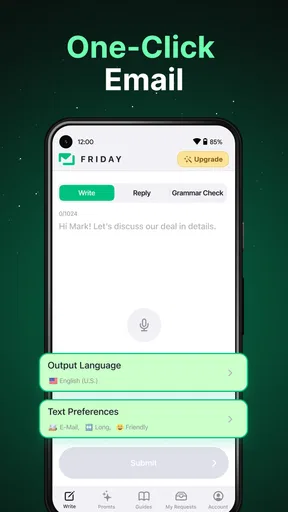
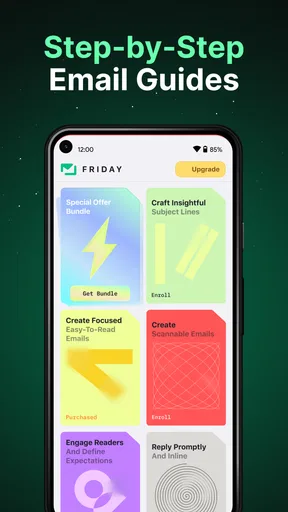
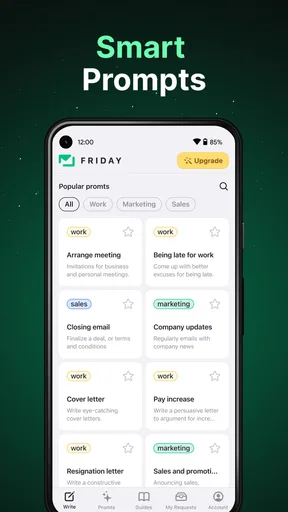
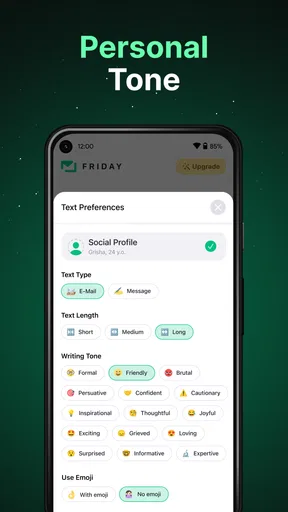
 Analysis by AppCompare
When several people share a phone or tablet, an AI writing app can look like a handy household tool—but it helps to be clear about whose account is connected and who is using it. I’d treat Friday as a personal writing assistant, not a shared inbox or a family coordination system. That distinction makes it easier to decide whether it belongs on a shared device or is better kept on one person’s phone.
A shared device is not the same as a shared account
A realistic use for Friday is one household member drafting a school email, another polishing a message to a landlord, or someone shaping a short story during a quiet moment. The app is a productivity tool from Players Link, built around AI-assisted writing for things such as emails, essays, stories, and chatbot exchanges. That range can make it useful to different people in the same home, even when their writing needs have little in common.
But different users should not assume that sharing a device means they should share an email account or personal drafts. Before anyone connects an account, I’d decide which person owns it and make sure others know when they are using that person’s session. For sensitive correspondence, I’d keep the work on the account holder’s own device rather than passing a logged-in phone around.
Make the first use a deliberate one
Friday is free to install, while in-app purchases are available at different prices. I’d start with a low-stakes task before relying on it for anything important: ask it to help shape a routine appointment request or turn a few rough notes into a more readable paragraph. That gives you a chance to judge whether its suggestions sound like you, without putting a delicate conversation or deadline at risk.
The key question is not only whether an AI can produce fluent text, but whether you are comfortable reviewing and owning the result. I would read every draft before sending it, especially if it includes a promise, a date, a personal detail, or a request that could be misunderstood. If you use it for an essay or a work message, the final wording should still reflect your own understanding and voice.
Useful for individual coordination, not household management
Friday may help one person prepare a message about a shared chore, a pickup change, or a bill question, but that is different from coordinating everyone’s plans. I would not treat it as a shared calendar, a family task board, or a source of truth for who agreed to do what. For ongoing household logistics, a calendar or shared notes app is usually a better fit because everyone can refer to the same record.
A practical workflow is to use Friday for the writing step, then send the final message through the communication app the household already uses. If a message contains the agreed time or responsibility, check those details against the original conversation before sending. This small handoff matters: AI can help make a note clearer, but it should not become the authority on a family decision.
Worth Reading Before You Choose

EA SPORTS FC Mobile 26 Is a Bigger Football Game, but It Takes Time

Flipboard Shows What News Apps Must Do Beyond the Feed

Switching to Android Auto Means Rethinking Your Driving Routine

Google Calendar Makes a Crowded Week Easier to Manage

Ludo King Makes the Most of the Minutes Between Plans

Baby Panda World Brings Quick Play to Modern Phones, but Its Game Library Feels Busy
Age and trust deserve a little care
The app is rated for Everyone, which makes its general audience broad, but that does not remove the need for adult guidance when a child uses an AI writing tool. I’d explain that a suggested answer is a draft, not a fact-checker or a substitute for learning how to write. For schoolwork, it is sensible to use the app for brainstorming or editing only when that fits the assignment’s rules, and to make sure the student can explain the finished work in their own words.
Friday has an average rating of 4.4 from around 38,000 ratings, and it has been installed over a million times. Those figures suggest that many people have tried it, but they do not tell me whether its tone or workflow will suit a particular household. I’d judge it by the quality of the drafts it produces for your own everyday tasks and by how comfortable you feel checking them.
One useful boundary is to avoid pasting private information into a prompt unless you have considered whether it is necessary. A writing request can often be made with names, account details, addresses, and other identifying facts removed. That habit is especially worthwhile on a shared device, where a family member may not realize that a draft includes information another person would rather keep private.
For households that want an assistant for several kinds of writing, the broad mix of email, essay, story, and chatbot use is more appealing than an app focused only on polishing business messages. On the other hand, if all you need is a quick spelling correction, your phone’s built-in keyboard or a basic text editor may be simpler. And if your main goal is collective planning, choose a tool designed for shared calendars or lists instead of expecting an AI writer to manage coordination.
The app is free, but the presence of optional purchases means I’d check the purchase choices before letting a child explore it unsupervised. I’d also set a household expectation that nobody sends an AI-generated message without reading it first. That is not a special feature; it is simply the most reliable way to avoid awkward wording, an inaccurate detail, or a tone that does not match the relationship.
Hey there! So, I recently got my hands on Friday: AI E-mail Assistant, and let me tell you, it’s a game changer if you’re someone who deals with a gazillion emails every day. I know, I know, another AI tool? But trust me, this one’s pretty neat.
Getting Started with Friday
First off, setting up Friday: AI E-mail Assistant was a breeze. You download it, connect your email account, and you’re off to the races. The interface is super user-friendly, which is a huge plus for those of us who aren’t tech wizards. It’s got a clean layout, and everything is pretty intuitive, so you won’t find yourself fumbling around trying to figure out what’s what.
The Features You’ll Love
Now, let’s dive into what makes Friday so cool. The app boasts a variety of features that are perfect for making your email life easier. One of my favorites is the smart reply suggestions. It’s like having a little email-savvy buddy who knows exactly what you want to say. It suggests responses based on the context of your emails, so you can save time and effort. And honestly, who doesn’t love saving time?
Another great feature is the email prioritization. Friday does this nifty thing where it sorts your emails by importance, ensuring you never miss what’s truly crucial. It’s like having a personal assistant who’s always got your back. Plus, the app integrates seamlessly with your calendar, reminding you of meetings and deadlines mentioned in your emails. Handy, right?
AI Magic at Work
So, how does the AI magic actually work? Well, Friday uses some pretty advanced algorithms to learn from your email habits. Over time, it gets better at predicting what you need and when you need it. It’s almost like Friday reads your mind, but without the creepy factor. The app also has a task management feature, which is super useful for keeping track of email-related to-dos. You can easily convert an email into a task with just a few clicks.
For everyday use, I’d lean on those tools in small, repeatable ways rather than handing the app an entire inbox and expecting it to make every decision correctly. For example, when I’m putting off a reply because I can’t find the right tone, a suggested response can give me a starting point; I can then correct names, commitments, and wording before sending. When an email includes a deadline, I’d still check the original message after turning it into a task. That keeps the convenience while avoiding the easy mistake of trusting a summary more than the source.
That distinction is also useful when comparing Friday with ordinary email clients. A standard mail app is often the better choice if you mainly want to read, search, and send messages with familiar controls. Friday’s appeal is the extra writing and organization help, not a reason to abandon good inbox habits. If you already have a system that keeps your mail under control, the AI layer may feel unnecessary; if blank-page replies and scattered follow-ups slow you down, it has a more convincing role.
Security and Privacy
Alright, let’s talk about something we all worry about: security. Friday takes your privacy seriously. It uses end-to-end encryption to protect your data, so you can rest easy knowing your information is safe from prying eyes. They’ve really put in the effort to ensure that your email conversations remain just between you and the intended recipient.
Even with that reassurance, I’d keep a simple review habit: use the least personal detail needed to get a useful draft, and inspect the result before it goes anywhere. This is particularly important when an email concerns work, finances, health, or family matters. A polished sentence can still carry the wrong implication, and a confident-sounding suggestion is not automatically an accurate one.
Where It Could Improve
Of course, no app is perfect, and Friday has a couple of areas where it could improve. For instance, while the app is pretty responsive, there are moments when it lags a bit, especially when dealing with a large volume of emails. It’s not a dealbreaker, but it’s something to be aware of if you’re dealing with an overflowing inbox.
That makes it a less obvious fit for someone who expects an app to instantly tame years of accumulated mail. I’d try it first on the kind of messages that arrive every day and see whether its sorting and writing suggestions actually reduce effort. If the lag interrupts the moments when you need to move quickly, a simpler mail client may be more dependable for the core job, with Friday reserved for drafting when there is time to review.
Another thing is the learning curve for the AI. While it gets better over time, it might take a few weeks before it truly understands your emailing style. Patience is key here, but once it gets the hang of it, you’ll see a noticeable difference in how much more efficient your email management becomes.
I would not wait for it to learn my voice before checking each message, either. The safest way to benefit from suggestions is to treat them as editable raw material: keep the useful structure, replace phrases that sound unlike you, and remove anything you would not personally stand behind. For people who prefer to write every word themselves, or who handle highly sensitive correspondence, that extra review may outweigh the time saved.
Final Thoughts
So, is Friday: AI E-mail Assistant worth it? In my opinion, absolutely. If you’re someone who spends a good chunk of your day sifting through emails, this app can save you loads of time and hassle. It’s not just about responding faster; it’s about responding smarter. The app’s ability to learn and adapt to your habits is truly impressive, and it’s a great tool for keeping your email game strong.
Friday is a free productivity app from Players Link, with optional in-app purchases ranging from $4.99 to $99.99 per item. It was released on February 22, 2023, and version 1.1.22 requires Android 7.0 or later. Those practical details make it easy to consider trying, but I’d still decide based on your routine: people who draft lots of everyday messages may find the assistance worthwhile, while someone who only checks email occasionally probably does not need another layer in the process.
All in all, Friday is like having a super-smart email buddy that takes care of the little things, so you can focus on what really matters. Give it a shot, and you might just find yourself wondering how you ever managed without it!
Who I’d recommend it to
I’d suggest trying it if you regularly turn rough thoughts into emails, need help getting a first draft started, or want one app that can also support other kinds of writing. It is less compelling for a person whose inbox is already quiet and organized, or for anyone hoping it will independently manage complex projects. The best results come when you have a clear task and are willing to make the final call yourself.
On Android, the minimum operating system requirement is 7.0, so it can suit a range of devices that meet that baseline. Compatibility alone does not guarantee a smooth experience on every phone, particularly when an inbox is large; I’d start with a few ordinary messages and see whether the pace feels comfortable on your device.
A grounded household verdict
My household take is that Friday works best as one person’s assistant for writing and handling email, rather than as a shared family hub. It can help a parent draft a concise note or a student organize an initial idea, but everyone should keep account ownership clear and review the text they plan to send. For shared schedules, chores, and decisions, use a tool built to keep a common record. For writing help across email and other formats, Friday is the more relevant option—provided you are comfortable checking its work.
Pros
- Enhances email productivity significantly.
- Supports multiple email platforms seamlessly.
- Customizable templates for faster responses.
- Integrates well with calendar apps.
- AI learns preferences for personalized replies.
Cons
- Limited offline functionality.
- Requires subscription for advanced features.
- Occasional AI errors in tone detection.
- Steep learning curve for new users.
- May not support all email providers.
FAQs for Friday: AI E-mail Assistant
What is the main functionality of Friday: AI E-mail Assistant?
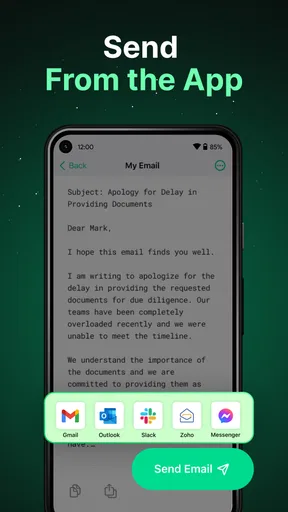
Friday: AI E-mail Assistant is designed to streamline your email management by using artificial intelligence to draft, organize, and send emails. It helps automate repetitive tasks, provides smart suggestions, and allows users to focus more on important communications while maintaining productivity.
Is Friday: AI E-mail Assistant secure to use with sensitive information?
Yes, Friday: AI E-mail Assistant employs robust encryption protocols to ensure your data remains secure. It respects user privacy and complies with data protection regulations, ensuring your emails and personal information are safe from unauthorized access or breaches.
Can Friday: AI E-mail Assistant be integrated with other email platforms?
Absolutely. Friday: AI E-mail Assistant is compatible with major email services like Gmail, Outlook, and Yahoo Mail. It seamlessly integrates with these platforms, allowing you to manage all your emails from a single, unified interface without any hassle.
Does Friday: AI E-mail Assistant require a constant internet connection to function?
While a constant internet connection is beneficial for real-time updates and email syncing, Friday: AI E-mail Assistant can perform basic drafting and organizing tasks offline. However, sending or receiving emails will require reconnecting to the internet.
Is there a learning curve to using Friday: AI E-mail Assistant effectively?
The app is designed to be user-friendly, featuring an intuitive interface that minimizes the learning curve. New users can quickly become proficient with its features thanks to in-app tutorials and customer support, making it accessible for both tech-savvy individuals and beginners.


